
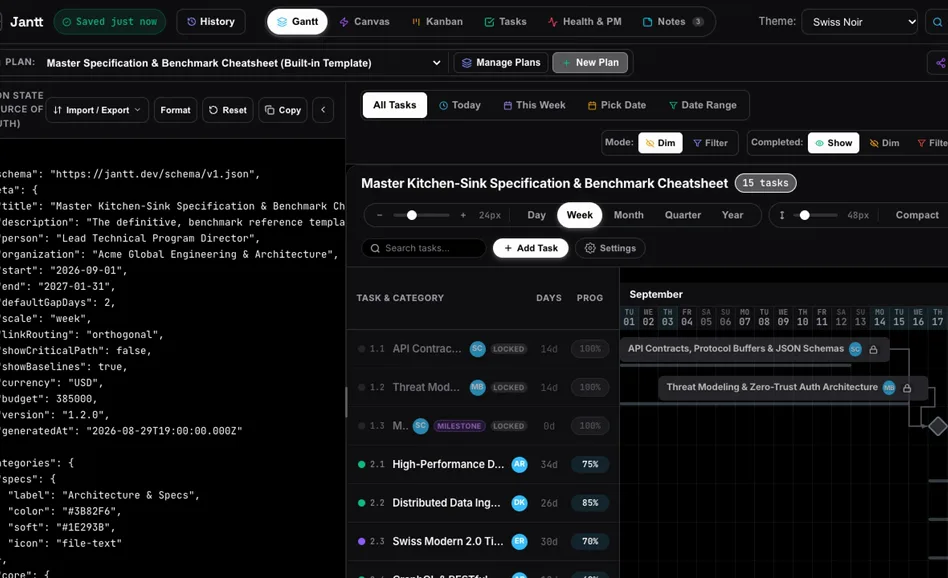
Jantt is a free, open-source tool for project timelines (Gantt charts: every task is a bar on a calendar). It runs in your browser, no account. You describe the job to an AI chat such as ChatGPT, Claude or Gemini, the chat answers with a plan in Jantt's format, and Jantt draws it: drag a task and the ones that depend on it move along, see which tasks set the finish date, switch to a card board for the crew. The MIT license allows business use. Made by Ahmad Hassan. The interface is in English.
1. Open it
- In the browser on a computer: ahmadhassan-bted.github.io/Jantt. You also need any AI chat: ChatGPT, Claude or Gemini. A free plan is usually enough.
- The page opens with a sample plan. The JSON State pane on the left holds the plan as text, the chart on the right draws it. If the pane is hidden, click Show JSON Editor.
- Plans are saved inside this browser (the badge at the top says Saved). Save important ones to a file, see step 7.
2. Copy the instruction for your AI
Click AI Prompt at the top right. In the window that opens, stay on the LLM System Prompt tab and click Copy LLM System Prompt. This text teaches the chat to answer in Jantt's format.
3. Describe your project
Paste that text into the chat and write your job underneath: the tasks, how many days each takes, what must finish before what. Ask for JSON only. For example:
A house build starting March 1, 2027. Tasks in order: site survey 11 days; house design 26 days after the survey; building permit, a milestone after the design; earthworks 8 days; foundation 22 days; walls and floors 36 days; roof 15 days; windows and doors 11 days; electrics and plumbing 22 days; interior finish 36 days; facade 29 days; landscaping 15 days; handover, a milestone. Answer with the Jantt JSON only.
Copy the whole answer.
4. Paste the plan into Jantt
Click inside the JSON State pane, select all (Ctrl+A, or Cmd+A on a Mac) and paste the answer over the sample. The line at the bottom of the pane should say Valid Jantt Plan with your number of tasks, and the chart redraws itself. If it reports schema issues instead, paste the message back into the chat and ask for a fix.
5. Move tasks and see what matters
- The buttons above the chart set the scale: Day, Week, Month, Quarter, Year. Fit on the right shows all rows at once.
- Drag a bar to a new date. The tasks that depend on it shift along; the switch for that is Auto-Cascade Tasks under Settings.
- Click Critical Path: the chain of tasks that sets the finish date lights up. Shorten one of these and the whole job ends earlier; the other tasks have slack.
6. Other views of the same plan
The tabs at the top switch the view. Kanban shows the tasks as cards to move between columns, handy for the crew. Health & PM shows time remaining, work done, bottleneck tasks and a table with the buffer of every task. Tasks is a checklist.
7. Save and export
At the top of the JSON State pane click Import / Export, then Export as JSON to keep a file you can load back with Import JSON Plan, or Export as CSV for a spreadsheet.
Let AI do it (optional)
Jantt also ships a server for AI assistants (MCP), so Claude Desktop or Cursor can work on the plan themselves: inspect it, add or reschedule a task, audit the schedule, compare two plans, export CSV. The README section "AI Agent Protocol" shows the config for your assistant; the server itself is one command:
npx @jantt/mcp
Good to know
- Young project: the repository started on Aug 28, 2026, version 1.1.0 came out on Nov 2, 2026 and the code was last updated on Nov 9, 2026, so a button may move.
- Everything in this guide works without an account. Connect Cloud (shared rooms with a GitHub sign-in) is optional.
- The plan is the chat's draft: check dates and durations against your own experience before you send it to anyone.
- Code, docs and license: github.com/AhmadHassan-BTed/Jantt (MIT).
Sources: Jantt README and the playground source code in the same repository, checked Nov 9, 2026.
We are not affiliated with Ahmad Hassan or the Jantt project.