
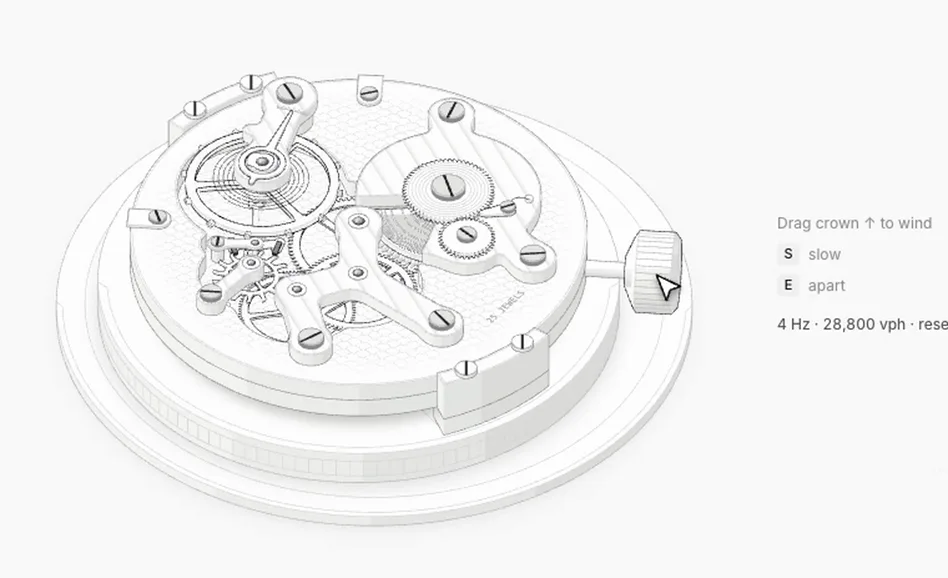
Anatomy is a free, open-source skill (an add-on) for Claude Code, Anthropic's AI coding assistant. You name an idea in one line and the assistant builds it as an interactive isometric drawing of a machine: dozens of small shaded parts that move under your mouse, with live numbers that come from the same model. The result is yours as a standalone HTML page, a single SVG file or React/Next.js components, light or dark. The MIT license allows business use. Made by Ryan (wheresryan22). The skill is free; Claude Code itself is a paid product (a subscription). It also runs as a standard agent skill in Antigravity, OpenCode, Codex and MiniMax Code.
1. What you need
- Claude Code installed and signed in, or one of the other agents: Antigravity, OpenCode, Codex, MiniMax Code.
- Node.js 22.20 or newer: the installer behind
npx skills add(version 1.7.1) asks for it; the skill itself runs on 20.10 or newer. No API keys, nothing tonpm install. Chrome or Chromium for the skill's own browser checks of the drawing.
2. Install the skill
One command in the terminal:
npx skills add wheresryan22/anatomy -g -a claude-code
For another agent replace claude-code with antigravity, opencode, codex or minimax-code. The author's site also offers a ZIP to unzip into the agent's skills folder.
3. Ask for a drawing
Open Claude Code and type /anatomy followed by what you want explained (in Codex it is $anatomy). Examples from the author's site:
/anatomy explain how a pin tumbler lock opens, interactive
/anatomy explain how a gas burner mixes air and fuel, interactive, WebGL
The word interactive matters: the figure then answers the mouse and the keyboard, a machine you can play with. Leave it out and you get a still drawing.
4. Say what you want
The author's three tips: name the idea, not the drawing, and give real numbers; or name the object you want and say what should move; and say where the figure will live (a web page, docs, a slide) and whether it should be light or dark. Add "WebGL" for fire, water, steam and lamp light, or "3D" for parts that turn in true 3D (that mode is beta).
5. Wait, then open the result
Building a figure is a long session on purpose: the assistant plans, draws the geometry, audits it and checks it close up. The author's site gives the times: a figure of 40 to 80 parts takes 30 to 90 minutes, a larger one of 80 to 150 parts 2 to 4 hours, the biggest 6 hours or more. The author's watch movement came from one line and took one hour and fifty-four minutes of the assistant's active time. Open the finished HTML page in your browser and drag the parts as the hints on the figure say.
6. Use the file
What you get is your source: a standalone HTML page, one .svg, or React/Next.js components (React 18 or newer). Put it on your site, in your docs or in a presentation. Check the numbers on the figure yourself before you publish them.
7. Print it (optional)
Add it to your request, for example "Also make a printable A4 PDF of it". Three formats: a poster (one page), a technical drawing (one page) and a handout (two to four pages), in black and white, on A4 or US Letter (the skill's --letter option). The repository ships the author's own sample posters, such as a push button and an arcade cabinet.
Good to know
- Limits, in the author's words: it is not a chart library, so no axes or data plots; it draws machines, instruments, tools and furniture, not people or exact maps; shaders need WebGL, and without it the SVG still reads; under reduced motion every figure goes still.
- Young project: the repository started on Oct 8, 2026, version 1.1 came out on Oct 12, 2026 and the code was last updated on Oct 18, 2026.
- Try finished figures in the browser first: the collection at skills.wheresryan.sh/anatomy has 33 of them (a watch movement, a turbofan, a marble run and more). The figures are MIT too.
- A long session uses your assistant's plan or credits accordingly.
- Code and license: github.com/wheresryan22/anatomy (MIT).
Sources: Anatomy README and skills.wheresryan.sh/anatomy, checked Nov 9, 2026.
We are not affiliated with Ryan (wheresryan22).